☞☞☞AI 智能聊天, 问答助手, AI 智能搜索, 免费无限量使用 DeepSeek R1 模型☜☜☜
本文推荐英伟达开源的一个自底向上姿态模型,无需先进行人物检测,直接对姿态关键点进行估计,再进行多人匹配, 运行效率非常高。
TrtPose是一款轻量级,推理速度极快的姿态估计模型,作者在本地基于C++、Cuda和Tensorrt实现的TrtPose,单帧推理不足2ms, 在JetsonNano上也运行得非常快。
原代码基于PyTorch实现: https://github.com/NVIDIA-AI-IOT/trt_pose
在Python代码基础上,本文也基于TensorRT c++ API手撕网络层,创建更高效的TensorRT引擎文件,在C++ Demo项目中以平均1.6ms(只是enqueue不包含其他步骤)速度完成视频推理。
网络结构相对比较简单,以Resnet18作为BackBone, Head部分采用CmapPafHeadAttention, 包含了注意力模块和UpsampleCBR上采样模块。
Resnet18可以直接使用paddle.vision.models里的, 所以搭建起来非常方便。
class ResNetBackbone(nn.Layer):
    def __init__(self, resnet):
        super(ResNetBackbone, self).__init__()
        self.resnet = resnet
    def forward(self, x):
        x = self.resnet.conv1(x)
        x = self.resnet.bn1(x)
        x = self.resnet.relu(x)
        x = self.resnet.maxpool(x)
        x = self.resnet.layer1(x) # /4
        x = self.resnet.layer2(x) # /8
        x = self.resnet.layer3(x) # /16
        x = self.resnet.layer4(x) # /32
        return xclass UpsampleCBR(nn.Sequential):
    def __init__(self, input_channels, output_channels, count=1, num_flat=0):
        layers = []        for i in range(count):            if i == 0:
                inch = input_channels            else:
                inch = output_channels

            layers += [
                nn.Conv2DTranspose(inch, output_channels, kernel_size=4, stride=2, padding=1),
                nn.BatchNorm2D(output_channels),
                nn.ReLU()
            ]            for i in range(num_flat):
                layers += [
                    nn.Conv2D(output_channels, output_channels, kernel_size=3, stride=1, padding=1),
                    nn.BatchNorm2D(output_channels),
                    nn.ReLU()
                ]
        super(UpsampleCBR, self).__init__(*layers)class CmapPafHeadAttention(nn.Layer):
    def __init__(self, input_channels, cmap_channels, paf_channels, upsample_channels=256, num_upsample=0, num_flat=0):
        super(CmapPafHeadAttention, self).__init__()
        self.cmap_up = UpsampleCBR(input_channels, upsample_channels, num_upsample, num_flat)
        self.paf_up = UpsampleCBR(input_channels, upsample_channels, num_upsample, num_flat)
        self.cmap_att = nn.Conv2D(upsample_channels, upsample_channels, kernel_size=3, stride=1, padding=1)
        self.paf_att = nn.Conv2D(upsample_channels, upsample_channels, kernel_size=3, stride=1, padding=1)
        self.cmap_conv = nn.Conv2D(upsample_channels, cmap_channels, kernel_size=1, stride=1, padding=0)
        self.paf_conv = nn.Conv2D(upsample_channels, paf_channels, kernel_size=1, stride=1, padding=0)    def forward(self, x):
        xc = self.cmap_up(x)
        ac =  nn.functional.sigmoid(self.cmap_att(xc))
        xp = self.paf_up(x)
        ap =  nn.functional.tanh(self.paf_att(xp))        return self.cmap_conv(xc * ac), self.paf_conv(xp * ap)
自底向上目前有两种主流的方式, 第一种直接回归坐标, 思路直接,可以直接获得关键点位置,往往有更快的预测速度。然而,由于人体姿态的自由度很大,直接预测坐标的建模方式对神经网络的预测并不友好,预测精度受到了一定制约。第二种思路基于热图的方法在每个位置预测一个分数,来表征该位置属于关键点的置信度。根据预测的热图,进一步提取关键点的坐标位置。
TrtPose也是基于热图的方式,采用OpenPose的解码原理。所以后处理相对比较复杂,而且源代码是c++插件的方式, 这里我将其改成了python代码并简单做了相应的输出对齐。 模型推理的大致流程如下:
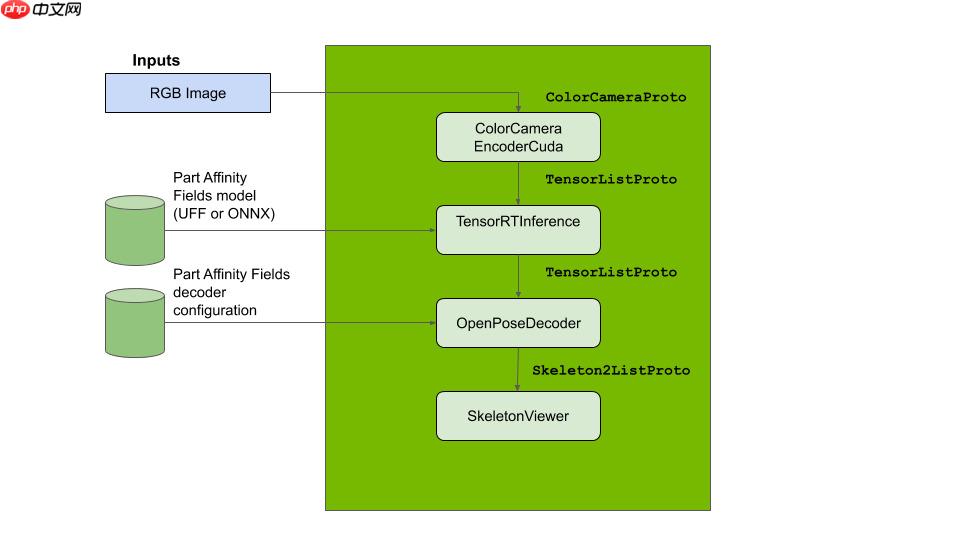
更多详细的原理介绍可参考: https://docs.nvidia.com/isaac/isaac/packages/skeleton_pose_estimation/doc/2Dskeleton_pose_estimation.html
%cd /home/aistudio/work/human
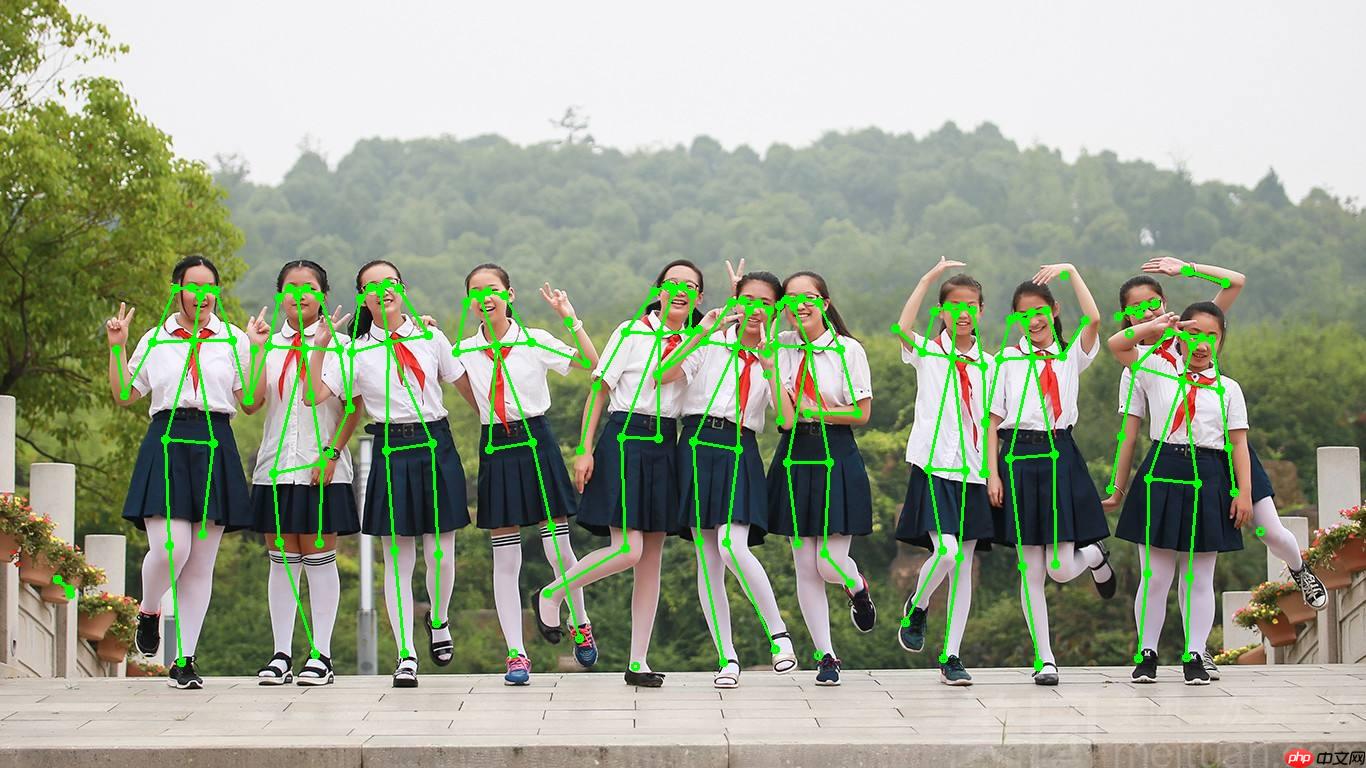
!python infer.py /home/aistudio/tmp/10p.jpeg
推理结果图片:
from work.human.trt_pose_model import get_modelimport paddleimport structinput = paddle.ones((1, 3, 224, 224))
model = get_model()# print(model) #查看网络结构wgts = paddle.load("/home/aistudio/data/data127829/trt_pose.pdparams")
f = open('trt_pose.wts', 'w')
f.write('{}\n'.format(len(wgts.keys())))for k, v in wgts.items():    # print("weight key: ", k, v.shape)
    vr = v.numpy().flatten()
    f.write('{} {} '.format(k, len(vr)))    for vv in vr:
        f.write(' ')
        f.write(struct.pack('>f',float(vv)).hex())
    f.write('\n')
f.close()print("weight file created!!!")
weight file created!!!
2.生成TensorRT引擎文件
参考本人项目: https://github.com/thunder95/tensorrtx/tree/master/trt_pose
 Openflow
一键极速绘图,赋能行业工作流
 88
查看详情
88
查看详情

将trt_pose.wts放在本目录下,创建trt_pose.engine引擎文件
mkdir buildcd build
cmake ..make./trt_pose -s
demo中支持图片和视频文件推理,运行命令:
./trt_pose -d
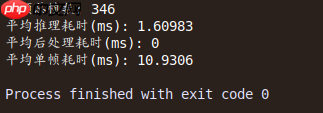
测试一段364帧的视频,耗时统计如下:
本数据集来源: https://github.com/noahcao/animal-pose-dataset
包含有5种类别(cow, sheep, horse, cat, dog), 数据标注按照COCO格式,对于每个实例标注有边界框[xmin, ymin, xmax, ymax], 以及关键点的二维坐标[x, y, visible]
20 关键点: Two eyes, Throat, Nose, Withers, Two Earbases, Tailbase, Four Elbows, Four Knees, Four Paws.
In [4]# 解压你所挂载的数据集在目录下!unzip -oq /home/aistudio/data/data127829/images.zip -d /home/aistudio/data !cp /home/aistudio/data/data127829/keypoints.json /home/aistudio/data# 查看数据集的目录结构!ls /home/aistudio/data !tree /home/aistudio/data -d
data127829  images  keypoints.json
/home/aistudio/data
├── data127829
└── images

2 directories
In [5]
import cv2import matplotlib.pyplot as pltfrom work.animal.pre_visualize import visualize_img
plt.rcParams['font.sans-serif'] = ['SimHei']
plt.rcParams['axes.unicode_minus'] = False%matplotlib inline

img = visualize_img()
plt.figure("Image") # 图像窗口名称plt.imshow(img)
plt.axis('on') # 关掉坐标轴为 offplt.title('image') # 图像题目plt.show()
/opt/conda/envs/python35-paddle120-env/lib/python3.7/site-packages/matplotlib/__init__.py:107: DeprecationWarning: Using or importing the ABCs from 'collections' instead of from 'collections.abc' is deprecated, and in 3.8 it will stop working from collections import MutableMapping /opt/conda/envs/python35-paddle120-env/lib/python3.7/site-packages/matplotlib/rcsetup.py:20: DeprecationWarning: Using or importing the ABCs from 'collections' instead of from 'collections.abc' is deprecated, and in 3.8 it will stop working from collections import Iterable, Mapping /opt/conda/envs/python35-paddle120-env/lib/python3.7/site-packages/matplotlib/colors.py:53: DeprecationWarning: Using or importing the ABCs from 'collections' instead of from 'collections.abc' is deprecated, and in 3.8 it will stop working from collections import Sized
6117
image_path===> /home/aistudio/data/images/2007_000063.jpg
/opt/conda/envs/python35-paddle120-env/lib/python3.7/site-packages/matplotlib/cbook/__init__.py:2349: DeprecationWarning: Using or importing the ABCs from 'collections' instead of from 'collections.abc' is deprecated, and in 3.8 it will stop working
  if isinstance(obj, collections.Iterator):
/opt/conda/envs/python35-paddle120-env/lib/python3.7/site-packages/matplotlib/cbook/__init__.py:2366: DeprecationWarning: Using or importing the ABCs from 'collections' instead of from 'collections.abc' is deprecated, and in 3.8 it will stop working
  return list(data) if isinstance(data, collections.MappingView) else data
/opt/conda/envs/python35-paddle120-env/lib/python3.7/site-packages/matplotlib/font_manager.py:1331: UserWarning: findfont: Font family ['sans-serif'] not found. Falling back to DejaVu Sans
  (prop.get_family(), self.defaultFamily[fontext]))
<Figure size 432x288 with 1 Axes>
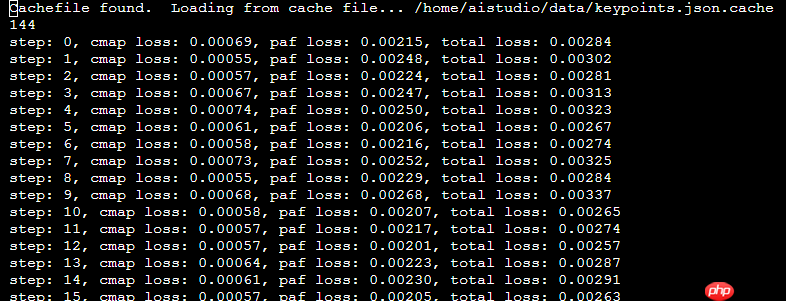
模型训练时间耗时太长, 可能原因是数据加载部分从C++插件方式转换成了python, 运行效率大幅降低。 目前训练的loss只能到0.001123及 0.001038
%cd /home/aistudio/work/animal/trt_pose_model.py
!python train.py
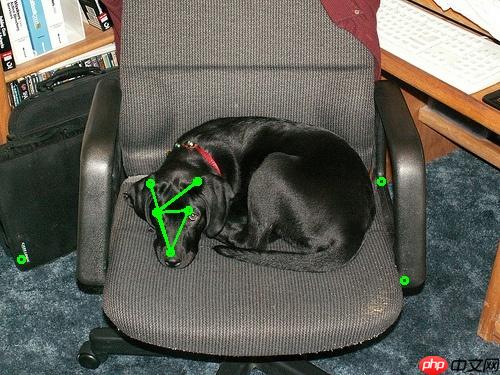
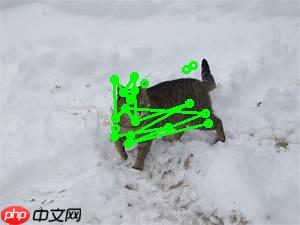
基于训练好的模型,可直接推理图片. 下面两条命令推理结果如下:
%cd /home/aistudio/work/animal/
!python infer.py /home/aistudio/data/images/2007_000063.jpg
/home/aistudio/work/animal
W0324 16:15:02.460222  2386 device_context.cc:447] Please NOTE: device: 0, GPU Compute Capability: 7.0, Driver API Version: 10.1, Runtime API Version: 10.1
W0324 16:15:02.465003  2386 device_context.cc:465] device: 0, cuDNN Version: 7.6.
(1, 21, 2, 100)
infer done
In [7]
%cd /home/aistudio/work/animal/
!python infer.py /home/aistudio/data/images/ca80.jpeg
/home/aistudio/work/animal
W0324 16:15:13.134407  2478 device_context.cc:447] Please NOTE: device: 0, GPU Compute Capability: 7.0, Driver API Version: 10.1, Runtime API Version: 10.1
W0324 16:15:13.139220  2478 device_context.cc:465] device: 0, cuDNN Version: 7.6.
(1, 21, 2, 100)
infer done
以上就是【AI达人创造营第二期】TrtPose复现、手动转TRT并训练动物姿态的详细内容,更多请关注其它相关文章!
# git
# 电器网站推广哪里的好
# 放心的网站制作及推广
# 樟树seo快速
# 海口网站建设专业公司
# 佛山营销网站建设咨询
# 芒果营销推广文案
# 湖南各地营销推广活动
# 滑县营销网站建设
# 小金口网站推广外包
# 极快
# 显存
# 上也
# 热图
# 可以直接
# 后处理
# 一言
# 第二期
# 达人
# 中文网
# coco
# fig
# latte
# udio
# c++
# ai
# python
# 网站线上推广工作怎么样
相关栏目:
【
Google疑问12 】
【
Facebook疑问10 】
【
优化推广96088 】
【
技术知识133117 】
【
IDC资讯59369 】
【
网络运营7196 】
【
IT资讯61894 】
相关推荐:
明略科技发布免费开源TensorBoard.cpp,促进大型模型的预训练工作
12页线性代数笔记登GitHub热榜,还获得了Gilbert Strang大神亲笔题词
多家欧洲企业签署公开信,批评欧盟 AI 法案草案限制产业发展
大模型训练成本降低近一半!新加坡国立大学最新优化器已投入使用
微软向美国政府提供GPT大模型,如何保证安全性?
普林斯顿大学推出Infinigen AI模型 可生成真实自然环境 3D场景
人工智能写作检测工具不靠谱,美国宪法竟被认为是机器人写的
人工智能加速走进百姓生活:从2025全球人工智能技术大会看行业新趋势
中科院自研新一代 AI 大模型“紫东太初 2.0”问世
朱民:普通人炒股炒不过机器人是很正常的 AI已经能理解市场情绪
编程版GPT狂飙30星,AutoGPT危险了!
华为HarmonyOS 4:享流畅提升20%,AI大模型更智能一览无余
AI证件照生成器:实际测试中AI软件展现了绝无仅有的强大效能
Valve 将拒绝采用 AI 生成未知版权内容的游戏上架 Steam
“无人驾驶船”将首次亮相世界人工智能大会,下半年或开进上海迪士尼
到中国科技馆体验“一滴油的奇妙旅行”,线上元宇宙展厅同步开启
大模型新品出现井喷,AI产业迎来新时代
第 66 届格莱美奖规定,AI 作品将无法获得评奖资格
腾讯自主研发机器狗 Max 升级,可“奔跑跳跃”完成避障动作
写出优质文章的妙招:利用"稿见AI助手"的实用指南
30+大模型齐聚,大模型成世界人工智能大会“顶流”
今年,全球客服中心支出将增长 16.2%,迎接对话式 AI 的浪潮,根据 Gartner 报告
羚客系统即将升级,推出全新的AI数字化工具
AI框架生态峰会本周开幕 华为昇腾“朋友圈”再聚首 全球首个全模态大模型将登场
企业软件行业更将被AI全面重构!Moka李国兴:未来优秀组织和个人将一定是善于使用AI生产力的
MetaGPT开源框架爆红 GitHub,达到1.1万星,模拟软件开发流程
组建团队,字节跳动要造机器人?
Meta发布"类人"AI图像创建模型,能解决多出手指等Bug
五款 AI 网站构建器,任何人都能快速构建网站
生活垃圾智能分类机器人社区展“才能”,征求居民意见
两小时就能超过人类!DeepMind最新AI速通26款雅达利游戏
李开复官宣新公司「零一万物」,进军 AI 2.0
人工智能在项目管理中的作用
掌阅科技对话式AI应用“阅爱聊”开启内测
图像生成过程中遭「截胡」:稳定扩散的失败案例受四大因素影响
你们的开机第一屏画面要变了!安卓机器人首次3D化
人工智能助力精准学习,猿辅导小猿学练机满足学生个性化学习需求
人工智能进入绿植界,智能庭院市场初具规模
本届人工智能大会上的这个“镇馆之宝”,来自长宁企业西井科技!
MiracleVision视觉大模型
OpenAI 向所有付费 API 用户开放 GPT-4
学而思推出AI第一课:基于自研大模型的AIGC课程
赋能选题探索:AI助手在经济学专业中的应用指南
「社交达人」GPT-4!解读表情、揣测心理全都会
网易云音乐内测上线“私人DJ” 打造AI推荐音乐助手
马克龙密会AI专家,法国加入全球人工智能竞赛
腾讯AI首次模拟拼接三星堆文物,工作取得阶段性的成果
能走、能飞、能游泳,科学家打造全能 M4 机器人
微软更新服务协议,以防止通过AI服务进行逆向工程和数据抓取
眼球反射解锁3D世界,黑镜成真!马里兰华人新作炸翻科幻迷
2025-07-31

运城市盐湖区信雨科技有限公司是一家深耕海外推广领域十年的专业服务商,作为谷歌推广与Facebook广告全球合作伙伴,聚焦外贸企业出海痛点,以数字化营销为核心,提供一站式海外营销解决方案。公司凭借十年行业沉淀与平台官方资源加持,打破传统外贸获客壁垒,助力企业高效开拓全球市场,成为中小企业出海的可靠合作伙伴。

 thon infer.py /home/aistudio/data/images/2007_000063.jpg